<?xml version="1.0" encoding="utf-8"?><feed xmlns="http://www.w3.org/2005/Atom" ><generator uri="https://jekyllrb.com/" version="3.10.0">Jekyll</generator><link href="https://saintsampo.github.io/BotSpace-blog/feed.xml" rel="self" type="application/atom+xml" /><link href="https://saintsampo.github.io/BotSpace-blog/" rel="alternate" type="text/html" /><updated>2026-05-15T03:07:02+00:00</updated><id>https://saintsampo.github.io/BotSpace-blog/feed.xml</id><title type="html">BotSpace</title><subtitle>Robots and More</subtitle><entry><title type="html">Open Source MiniFRC Climber</title><link href="https://saintsampo.github.io/BotSpace-blog/open-source-minifrc-climber/" rel="alternate" type="text/html" title="Open Source MiniFRC Climber" /><published>2020-05-02T00:00:00+00:00</published><updated>2020-05-02T00:00:00+00:00</updated><id>https://saintsampo.github.io/BotSpace-blog/open-source-minifrc-climber</id><content type="html" xml:base="https://saintsampo.github.io/BotSpace-blog/open-source-minifrc-climber/"><![CDATA[<p>MiniFRC has an interesting history of end-game tasks because saddly, in most games, no more than one or two robots have ended up regularly completing them. Climbing the tower in the Stronghold game was never attempted. A handful of robots could climb in Power Up and Deep Space but not many. The one exception was the 2017 game, which used the Steamworks rope climbing endgame task. Nearly half of robots that year could climb, likely because building a winch with velcro is much easier than any of the mechanisms needed in other years.</p>

<p>My point is that end-game tasks in MiniFRC are hard, and MiniFRC: Infinite Recharge is no exception. I created and posted this design because I am hoping to see a lot of climbing robots this year. B)</p>

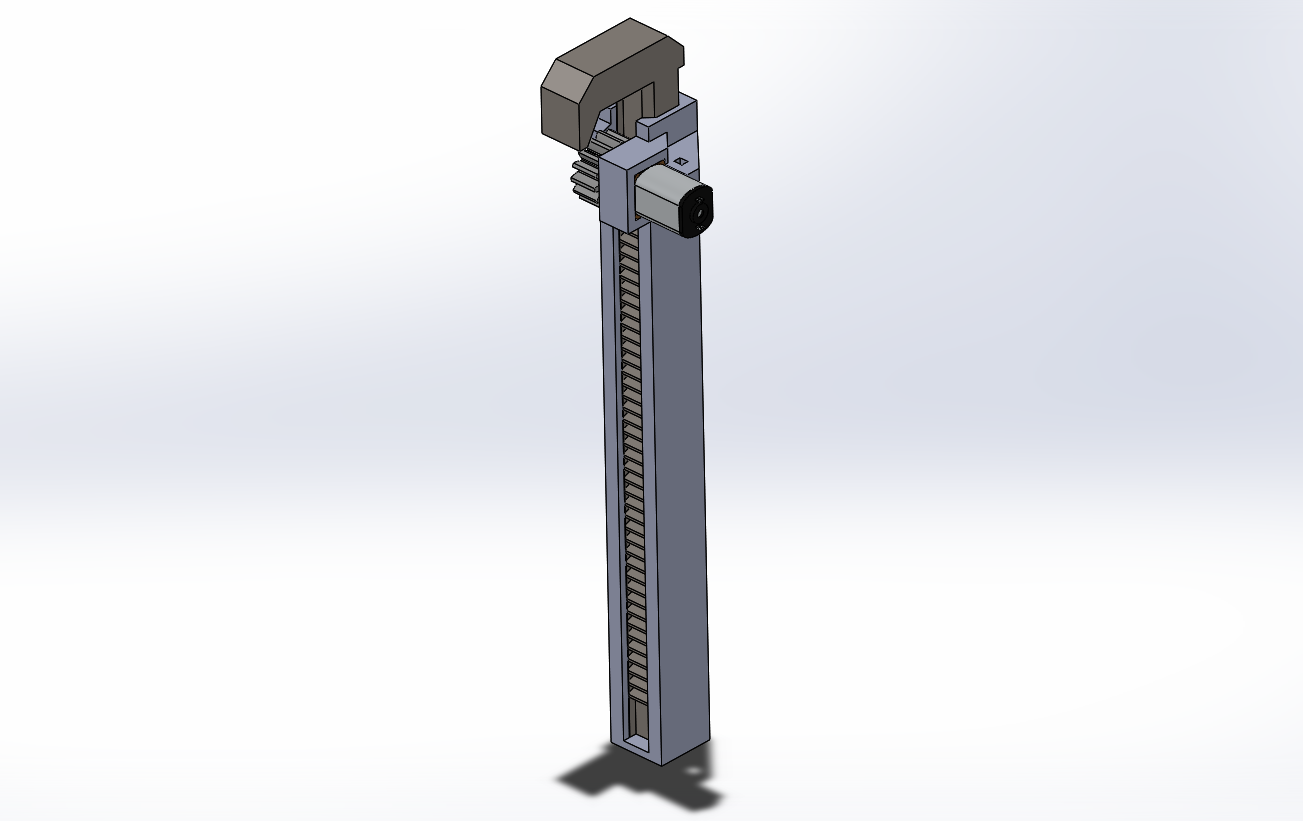
<p><img src="/BotSpace-blog/images/Minifrc climber skdwrks.png" alt="Minifrc climber skdwrks.png" /></p>

<p><a href="https://drive.google.com/file/d/1ETVyFEv6Q3soigAOWNp2srHNfdwMz0kP/view?usp=sharing">SLDPRT zip</a></p>

<p><a href="https://drive.google.com/file/d/10dSCo-1z4OkrMnQXhlyaSgPcRo47-Iiw/view?usp=sharing">STEP Files</a></p>

<p><a href="https://drive.google.com/file/d/1UNVwLxh0FrK7LA274SeD1Ul8pp816zmP/view?usp=sharing">STL zip</a></p>

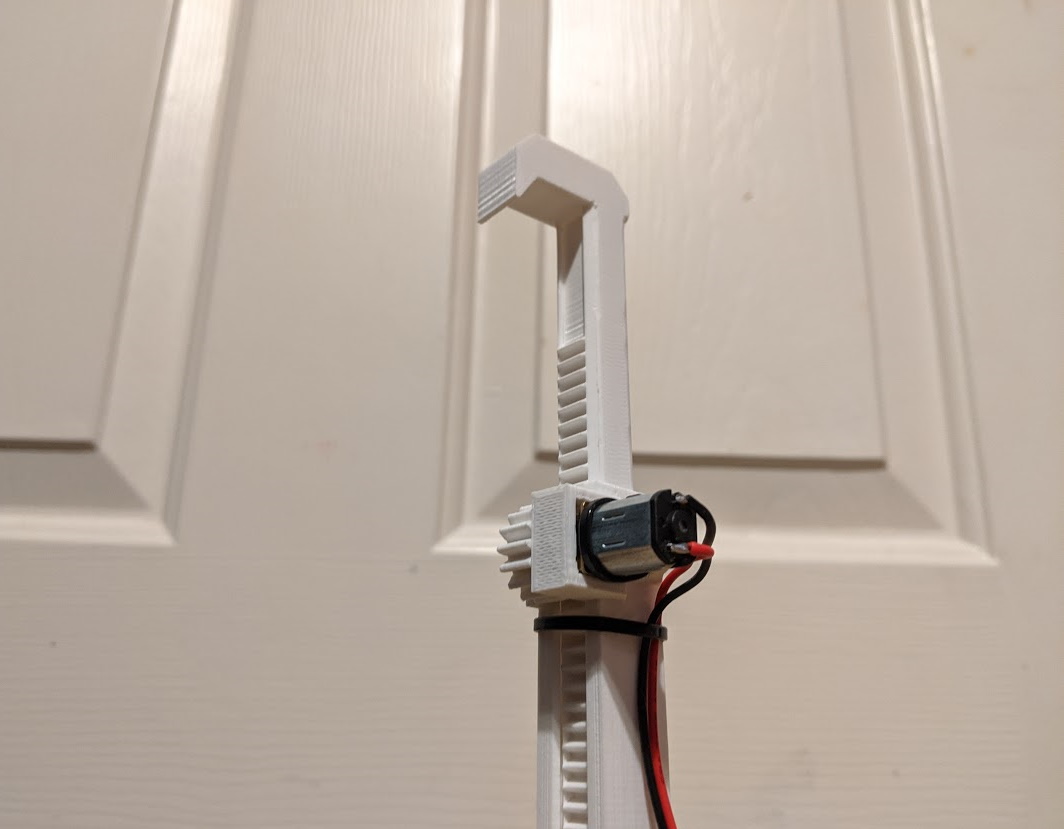
<p>I wanted to make this design parametric and clean it up more, but I figured I should go ahead and make what I have public. The design consists of three main 3d printed parts: a mount, the rack, and a pinion. I intentionally left no bolt holes or anything on the mount, you can CAD on your own or just hot glue it to your chassis. The rack and the pinion require some decent tolerances, you may need to adjust your printers XY-compensation to have them print correctly. All parts should be printed without support material. Assembly is fairly straightforward, don’t forget to add a couple zipties to keep the climber together.</p>

<p><img src="/BotSpace-blog/images/IMG_20200502_131455.jpg" alt="IMG_20200502_131455.jpg" /></p>

<p>As for the motor, I used a <a href="https://alfredoelectronics.github.io/products/n20-motor/">290 RPM N20 motor</a> for all of my testing. In theory you could use a 650 RPM motor if your robot is under ~1 kg but it’s probably not worth it. Even the 290 RPM motor lifts my 700g test chassis in about a second.</p>

<p>Motor——-Torque———-Torque/pitch radius = maximum force</p>

<p>290 RPM—–1.55 kg-cm——2.03 kg</p>

<p>650 RPM—–0.75 kg-cm——0.98 kg</p>

<p>1350 RPM—-0.25 kg-cm——0.32 kg</p>]]></content><author><name></name></author><category term="blog" /><summary type="html"><![CDATA[MiniFRC has an interesting history of end-game tasks because saddly, in most games, no more than one or two robots have ended up regularly completing them. Climbing the tower in the Stronghold game was never attempted. A handful of robots could climb in Power Up and Deep Space but not many. The one exception was the 2017 game, which used the Steamworks rope climbing endgame task. Nearly half of robots that year could climb, likely because building a winch with velcro is much easier than any of the mechanisms needed in other years.]]></summary></entry><entry><title type="html">Mini Differential Swerve Drive</title><link href="https://saintsampo.github.io/BotSpace-blog/differential-swerve-drive/" rel="alternate" type="text/html" title="Mini Differential Swerve Drive" /><published>2019-04-22T00:00:00+00:00</published><updated>2019-04-22T00:00:00+00:00</updated><id>https://saintsampo.github.io/BotSpace-blog/differential-swerve-drive</id><content type="html" xml:base="https://saintsampo.github.io/BotSpace-blog/differential-swerve-drive/"><![CDATA[<p>Mini Differential Swerve Drive is a project I started over a year ago. In FIRST Robotics Competition, Swerve Drive is a high-risk high reward drivetrain type that combines the omnidirectional capabilities of mechanism drive with the stellar traction of normal tank drive. The downside is the mechanical and programming complexity that is required to pull it off. For most teams, it is simply not effort effective to use, but in recent years it has been becoming more popular. For example teams like 2767 <em>Stryke Force</em>, 2910 <em>Jack in the Bot</em>, and 1323 <em>MadTown</em> have all brought swerve to Einstein finals.</p>

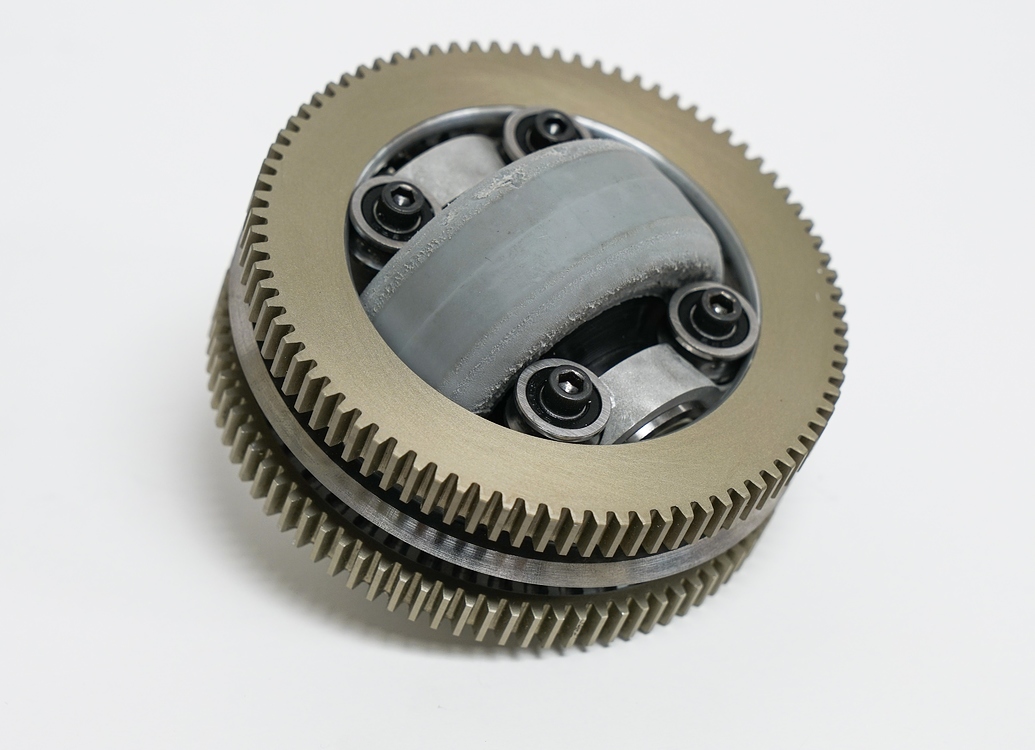
<p>Yes, swerve drive is very cool, but I am not a fan of the bulky, heavy, and complicated modules. I would normally have never touched swerve drive but a <a href="https://www.chiefdelphi.com/t/pic-differential-swerve-module-971/160525">post on Chief Delphi</a> caught my eye about a year and a half ago.
<img src="/BotSpace-blog/images/87184d96156d92dc88a3e1ce8f5b0717c6e520d9_2_1035x750.jpeg" alt="" /></p>

<p>At the time and to this day I am stunned with how clean and elegant this 971 module is. I was inspired to <del>copy</del> create my own version of the design and use it in MiniFRC 5. A friend and I worked on it a lot during our winter break in late 2017, even to the point where we got <a href="https://youtu.be/14knHvExIa4">a module working</a> (Sorry for the poor video quality).
<img src="/BotSpace-blog/images/DiffPic2.png" alt="" />
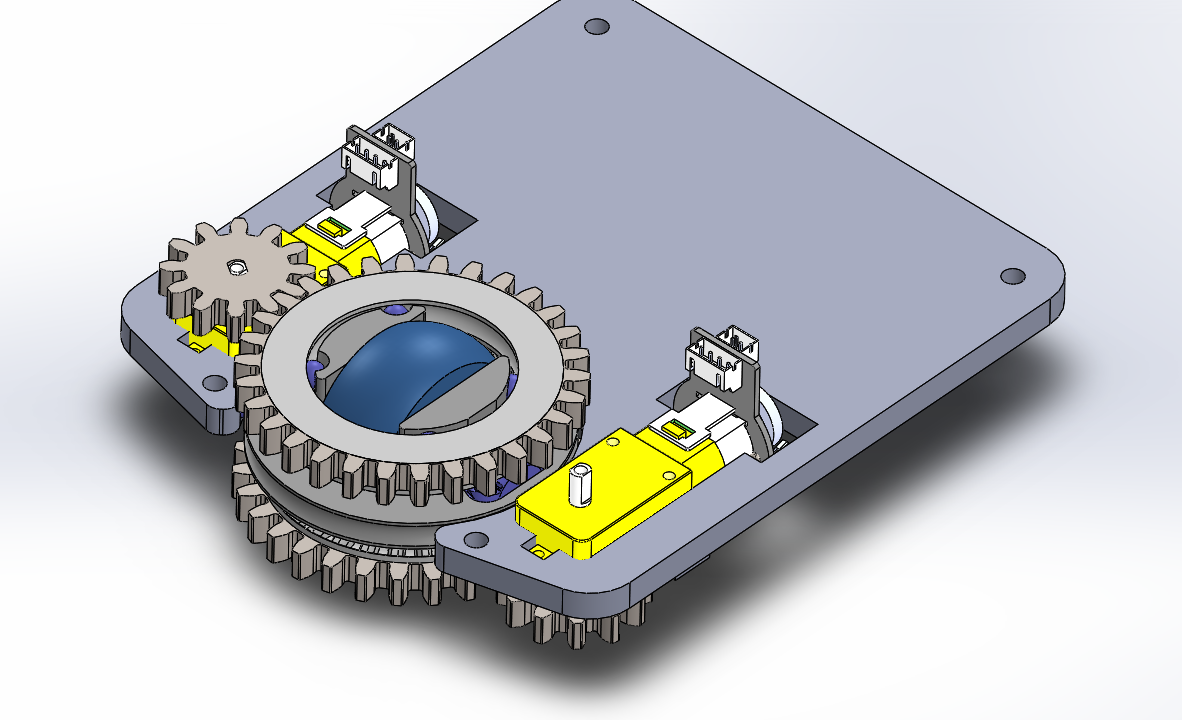
We didn’t end up using it in MiniFRC 5 because the modules are quite large, it would have been too much to try to fit even 3 modules within the frame limit, let alone other robot mechanisms. I plan to one day build a 3 module drivetrain. But until then I will go ahead and post the CAD here.</p>
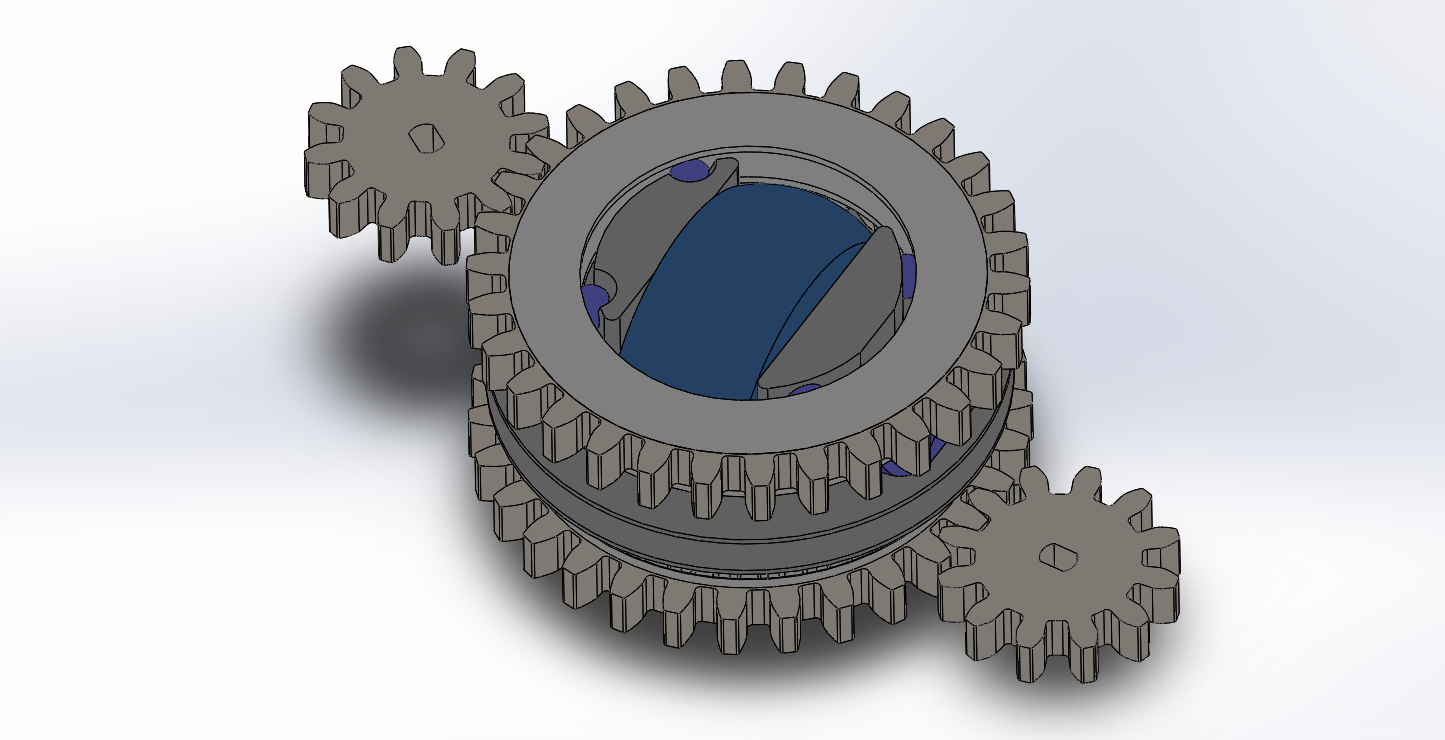
<p>https://drive.google.com/open?id=1odAfKXtke28jzhcQ9p3HLBChvFibkNH_</p>

<p>It’s mostly 3d printed, and you may have to adjust the horizontal expansion setting on your printer as the tolerances are very tight. The only metal parts are 1/4in ball bearings, 5/8in OD bearings, and (most annoyingly) a 3/16 hex rod for the main axle. If I were to bring this project back I would honestly use plastic Lego axles instead. The modules are built to run off of these <a href="https://www.aliexpress.com/item/TT-Motor-Smart-Car-Robot-Gear-Motor-for-Arduino-Free-Shipping-Wholesale/32642267017.html?spm=2114.search0604.3.3.762d2c77fhf1WS&amp;s=p&amp;ws_ab_test=searchweb0_0,searchweb201602_7_10065_10130_10068_10890_10547_319_10546_317_10548_10545_10696_453_10084_454_10083_10618_10307_537_536_10059_10884_10887_321_322_10103,searchweb201603_35,ppcSwitch_0&amp;algo_expid=60a2a1c4-a1a0-4011-8f93-847c8594bbe1-0&amp;algo_pvid=60a2a1c4-a1a0-4011-8f93-847c8594bbe1">TT motors</a> but you could modify the small spur gears for any shaft. Whatever you use just make sure they have encoders or you’re gonna have a bad time. I cut a corner when designing the big ring gears. they are actually two gears (a bevel gear and a spur gear) that need to be combined before they are exported as an STL for printing.
<img src="/BotSpace-blog/images/DiffPic1.png" alt="" /></p>]]></content><author><name></name></author><category term="blog" /><summary type="html"><![CDATA[Mini Differential Swerve Drive is a project I started over a year ago. In FIRST Robotics Competition, Swerve Drive is a high-risk high reward drivetrain type that combines the omnidirectional capabilities of mechanism drive with the stellar traction of normal tank drive. The downside is the mechanical and programming complexity that is required to pull it off. For most teams, it is simply not effort effective to use, but in recent years it has been becoming more popular. For example teams like 2767 Stryke Force, 2910 Jack in the Bot, and 1323 MadTown have all brought swerve to Einstein finals.]]></summary></entry><entry><title type="html">PyroBot at the Trinity College Robot Contest</title><link href="https://saintsampo.github.io/BotSpace-blog/the-big-trinity-post/" rel="alternate" type="text/html" title="PyroBot at the Trinity College Robot Contest" /><published>2019-03-13T00:00:00+00:00</published><updated>2019-03-13T00:00:00+00:00</updated><id>https://saintsampo.github.io/BotSpace-blog/the-big-trinity-post</id><content type="html" xml:base="https://saintsampo.github.io/BotSpace-blog/the-big-trinity-post/"><![CDATA[<p>The <em>Trinity College International Fire Fighting Robot Contest</em> is a yearly event where robots are tasked with navigating a simple maze and extinguishing a candle somewhere within as quickly as possible. On April 12th I flew up to Hartford, Connecticut to compete with my robot Pyrobot.</p>

<p><img src="/BotSpace-blog/images/pyrobot final.PNG" alt="pyrobot final.PNG" /></p>

<p>The PyroBot in this picture is very different from the robot I planned to build. I had high hopes for PyroBot, but as usual everything is twice as hard as you think it will be and takes twice as long as you think it should. Despite the setbacks, I am happy with the project as I was able to pull off a small victory in the end.</p>

<h3 id="the-rules">The Rules</h3>
<p>I won’t go into too much detail, but the gist is that you are allowed to do five total runs of your robot in three levels of increasing difficulty. You may only attempt a harder level once you have completed the one before it. You get 600 points for each level you don’t complete (unlike in baseball, lower scores are better). Your total final score is the sum of your best scores on each level. Level 1 is the most simple: you know where all the walls will be and the only obstacle is a stuffed animal randomly placed at one of three possible locations. Level 2 adds carpets, multiple wall configurations, and “decorations” on some of the walls (ie. mirrors and fabric). In Level 3 the two mazes are combined and start you randomly in the first. The goal is two blow out three candles in the second maze as well “rescue a baby” (move a doll from the second maze to the first).</p>

<h3 id="the-plan">The Plan</h3>
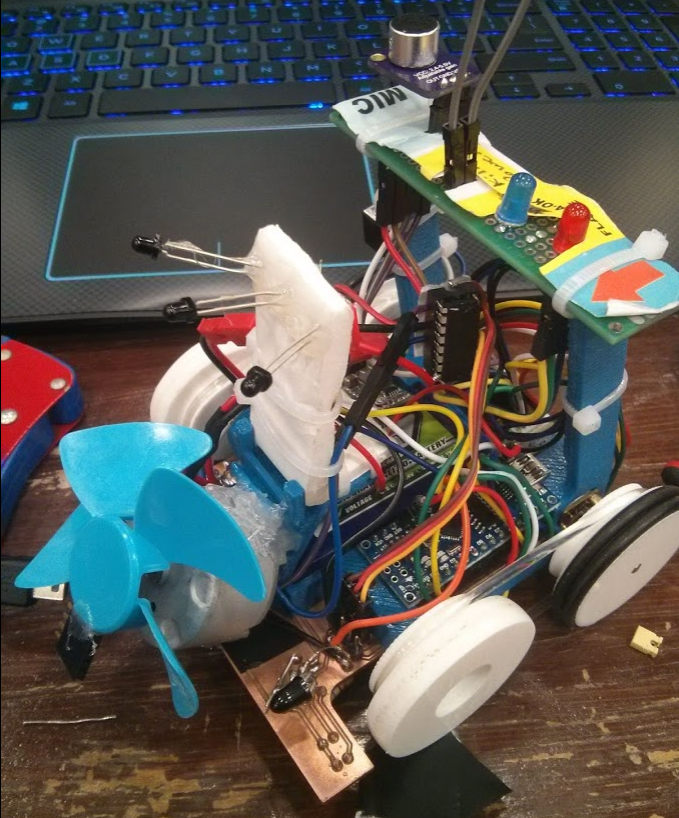
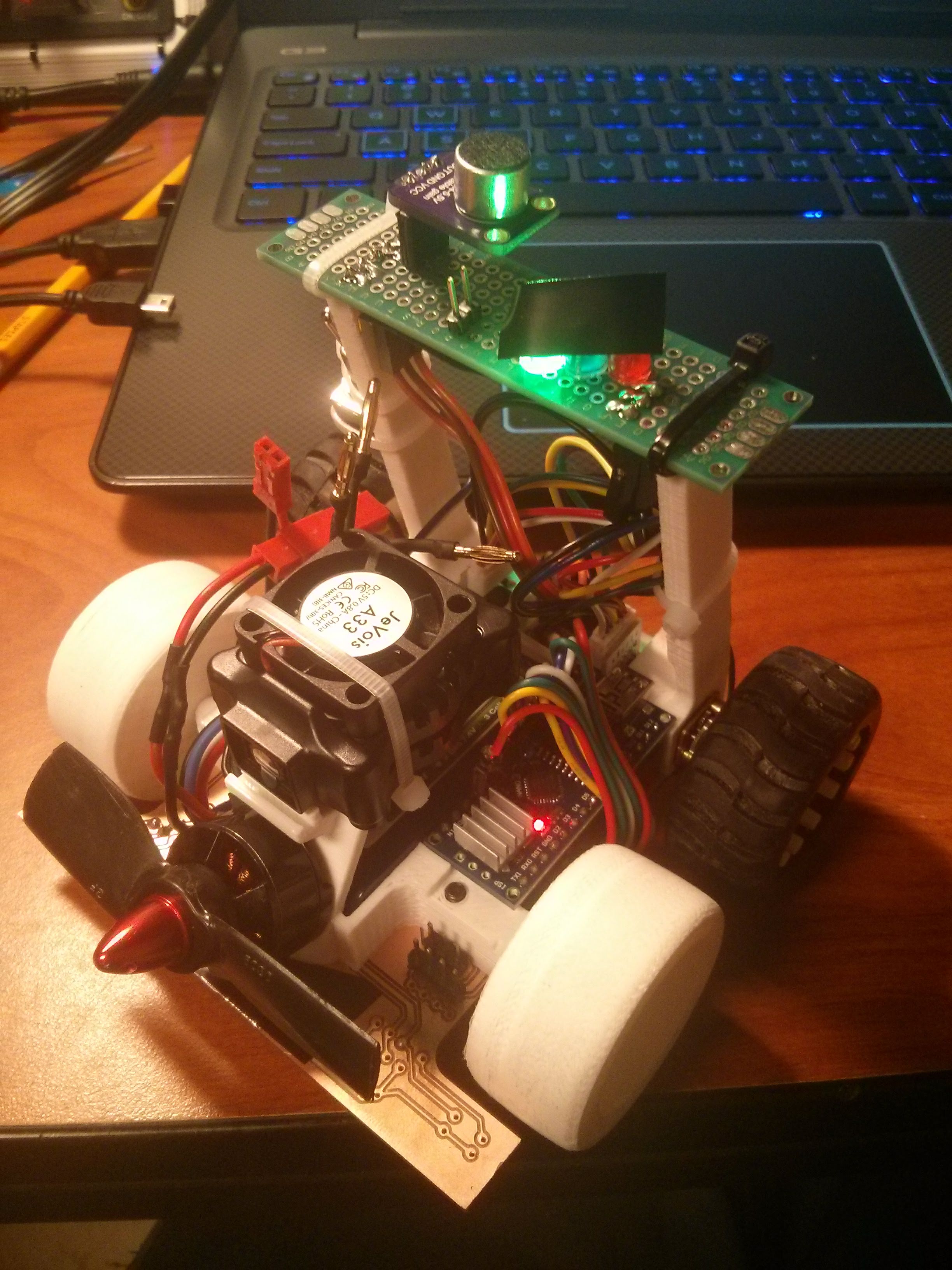
<p>My friend Kaiz and I began work on our strategy over 2 months ago. At first, the plan was to do almost everything and do it in the style of a <a href="https://youtu.be/A4hzCcFikm0?t=75">MicroMouse robot</a>. We noticed that most of the robots at past competitions were relatively slow (except for <a href="https://youtu.be/dxIxlKYgK44">this</a> bot from China, by far) but even the fastest robot didn’t compare to the speed of a MicroMouse. I splurged on some of the expensive IR LEDs (<a href="https://www.digikey.com/product-detail/en/osram-opto-semiconductors-inc/SFH-4545/475-2919-ND/2205955?utm_adgroup=Optoelectronics&amp;slid=&amp;gclid=CjwKCAjwzPXlBRAjEiwAj_XTEY_Bn_ii0FJhxkulefOmwNh326yjtMyb8GEm5WsBmxhUt5ty_riYpBoCXm8QAvD_BwE">sfh4545</a>) and phototransistors (<a href="https://www.mouser.com/datasheet/2/427/teft4300-84750.pdf">teft4300</a>) used by many MicroMice for distance sensing. The go-to motors for MicroMice were a bit out of my price range so I went with some aggressively geared N20 motors that had integrated encoders. The Motors were driven by a chip I am very familiar with, an L293D Dual H-Bridge. There is really no limit on what fan you are allowed to use to blow out the candle, so I chose to use the BLDC motor off of an RC plane I once built. Next, I chose the battery. After some testing with a 7.4V (2 cell) battery I wasn’t happy with the speed of the robot, so I decided to use a 11.1V (3 cell) battery instead, which also improved our fan performance. To control the robot I considered using an ESP32, but ultimately went with an Arduino Nano because of its size and my previous experience with the board. Again inspired by MicroMice, I chose to make the chassis of the robot a custom milled circuit board, fabricated on an OtherMill at (NC State’s ECE Maker Space)[https://my.ece.ncsu.edu/makerspace/]. Finally, we figured finding the candle was a great vision processing task and planned to use Kaiz’s JeVois vision processing camera with an IR pass filter. After carefully designing the 3D printed parts and circuit board and tediously soldering some wires, we thought we had the hardest problems solved.</p>

<h2 id="the-problems">The Problems</h2>
<h3 id="the-nanos">The Nanos</h3>
<p>I figured from the start it would take two iterations to design the circuit board: an initial prototype and a final product with all the kinks worked out. However, when I was designing the robot I made a fatal error. In order to save space, I hung the Nano underneath the robot where there was not enough vertical space for female headers, meaning that I soldered the Nano directly to the circuit board. This had the awful side effect that if we ever fried a Nano, we had to replace the entire chassis. You may think I’m stupid for even attempting a strategy like that, but in my defense it has worked great for me before on one of my combat robots. The difference between that project and this one is the combat robot was less complex and ran on much less than 12 volts. After 3 bricked chassis I gave up on the hanging method and moved the Nano to the top of the board with female headers. This ended up being the right choice by far as I only fried 2 more Nanos during development that I was able to “hot-swap” out. Unfortunately, by the time I made this switch we had lost 5 days (milling these boards is difficult) and I only had time to make a first iteration of the “hot-swap” design.</p>

<h3 id="voltage-regulation">Voltage regulation</h3>
<p>I fried the third Nano by supplying 12V to VIN. The documentation says that Nanos can run off of 12V but I looked into it and it seems that the 5V linear voltage regulators on Chinese clones can handle only around 7V to 10V. It was at this point I said “screw it” and added not one but three <a href="https://www.amazon.com/gp/product/B0758ZTS61/ref=ppx_yo_dt_b_asin_title_o03_s00?ie=UTF8&amp;psc=1">switch mode regulators</a> to the robot: a 7.5V regulator to keep the Nano happy, a 5V regulator for the JeVois as it could draw up to 1A, and a 3V reg for the IR LEDs. I was going to power the LEDs off of the Nanos 3.3V line, but they too draw a decent amount of current and I wanted to reduce the strain on the Nano as much as possible.</p>

<h3 id="the-boards">The Boards</h3>
<p>On top of the strategic errors surrounding the custom boards, the boards themselves were of poor quality and caused many issues. It was a pain to design them because any jump from one side of the board to the other has to be connected through vias. For example, all of the Arduino headers could only be soldered/accessed on the bottom of the board. The most common physical issue was a trace breaking (or in some cases frying), which meant I would have to run a wire to jump the connection. The worst issue resulted in me at one point ripping about 6 pads off of one section of the board and doing some very janky wiring to fix it.</p>

<h3 id="the-jevois">The JeVois</h3>
<p>If the other issues were thumb tacks, this issue was a train spike in the coffin. We only got the robot fully together a couple of days before the competition. At this point we knew we couldn’t “do everything”, but we at least felt like we could still be competitive.</p>

<p><img src="/BotSpace-blog/images/pyrobyte_all_together.jpg" alt="pyrobyte_all_together.jpg" /></p>

<p>It was then that I had to drop the JeVois. While Kaiz could get it to find the candle excellently when plugged into his laptop, we could not for the life of us get it to spit any of its data out over serial. We worked on this issue till 4:00 AM the night before my flight and to this day we don’t know what the problem was. I flew into Hartford with a robot that could barely navigate a maze and not only had never seen a candle before, but at that point was entirely blind.</p>

<h2 id="the-bodge">The Bodge</h2>
<h3 id="hardware">Hardware</h3>
<p>When I started this project I pictured rolling up to Hartford with a beautiful well-crafted robot that was basically a Micromouse with a fan on it. I’m very much a perfectionist; the robot would be a perfectly programmed, meticulously designed, and well-crafted machine. On Friday night a switch flipped in my head and my mentality changed. I couldn’t let perfect be the enemy of good and I just wanted to have the robot work at all. There were minor electrical issues to fix but the main issue was finding and pointing towards the candle. <em>At the hotel</em> I cannibalized some of the IR distance sensors off of the front of the robot and repurposed their phototransistors to instead look for the candle. I arrived at the competition site at 7:15 and was the first person inside the venue. After I set up my pit I spent the next 4 hours fixing minor electrical issues and preparing my robot to be inspected before noon. I knew the bot I had built was small, but at the inspection table, I was told my bot was one of the smallest the inspectors had ever seen. I realized that if I could just complete a single run, I would likely win the <em>tiny robot contest</em>, doing so became my primary and only goal.</p>

<h3 id="software">Software</h3>
<p>By 1:00 PM I was feeling good about my progress. Thereafter minor electrical issues sporadically popped up, but I was able to turn most of my attention to the software. I had to throw out a lot of the code I brought with me. Kaiz and I originally planned to move through the maze using a <a href="https://en.wikipedia.org/wiki/PID_controller">PID</a> based planned path, but now that I didn’t care about my score and time was a huge issue I changed my approach to that of a blind search. My strategy had 3 parts:</p>

<ul>
  <li>A simple right wall following PID loop using the robots front right distance sensor (this worked well because if the right wall ever “fell away” the robot would turn sharply right)</li>
  <li>The robot used its last remaining forward facing distance sensor to check if it was about to run into a wall. If a wall was detected it would back up, turn 90 degrees left, and continue to follow the wall.</li>
  <li>The robot would periodically turn off its IR LEDs and look for IR light. If it detected light above a threshold it knew the candle was nearby, at that point the main loop was done and the robot just had to blow out the candle.</li>
</ul>

<p>The first Item on this list was the most difficult to implement. I spent a good amount of time trying to tune parts of my PID loop: the terms, the max speed, and the output limits. After a while, I got a legendary suggestion from one of the other competitors:<em>rotate the sensor 45 degrees forward</em>. I rotated the sensor and increased my setpoint, it was like magic. It followed the wall and turned right when the right wall fell away on the first try. I still tuned the PID a bit more but for me it was a small victory after a long list of failures. After that, the front wall detection got working in no time, <a href="https://youtu.be/k0aB9E2kX8I">here</a> is the robot with the two behaviors combined.</p>

<p>The third part of my strategy worked quickly as well. Using the three phototransistors the robot could reliably find and even point at the candle. The main issue was the robot had a hard time knowing how far away from the candle it was. I never came up with a cool solution to that problem, I just programmed it to drive forward and backward until the candle was out.</p>

<h3 id="the-last-big-hurdle">The last big hurdle</h3>
<p>By 4:00 on Saturday I was feeling good but still nervous, because if I didn’t attempt my first two runs by 5:15 they both would be recorded as DNFs. I was all set to do a couple more practice runs and then head to the competition fields when I got hit with a final terrible problem, my BLDC motor wouldn’t spin! I spent the next hour and 15 minutes trying different PWM signals, eliminating any potential mechanical issues and I even swapped out the ESC but it never got up to speed. I lost the chance to attempt 2 of my 5 runs and left the event for the day.</p>

<h3 id="sunday">Sunday</h3>
<p>Sunday was crunch time. I gave up on the BLDC motor and resolved to use a different motor I brought, an impeller fan. I cannibalized a spare L293D into basically a MOSFET and tacked on the fan with hot glue. I had more success than with the BLDC motor (including my first successful unassisted practice run) but it was not very powerful and not reliable at all. I ended up borrowing a motor and broken fan from another team. I added a “counterweight” to fix the broken fan and that was the last big problem solved. From then on I was just testing and tuning. For me that was the most fun I had; all that remained was tweaking IR thresholds, time delays, and PID values until I was satisfied with my robots consistency. By 1:00 PM I was ready for my first run</p>

<h3 id="attempt-1">Attempt 1</h3>
<p>I’ll cut to the chase, it worked! Lucky for me the candle was in the first room PyroBot looked inside (although at that point the robot could search almost the entire maze). It wasn’t a thrilling run, but I was stoked. For me, it was incredible to clobber together a clutch success when not 48 hours ago the robot was blind and had no code. This also meant that I basically had the tiny robot award in the bag. I foolishly forget to record the run, but afterward, I recorded a <a href="https://youtu.be/EnO5fbiQ0Gs">recreation with the same starting conditions</a>.</p>

<h3 id="attempts-2-and-3">Attempts 2 and 3</h3>
<p>I didn’t make any changes for my second run, now in level 2. The run failed because the robot got stuck on the carpets. The drivetrain was already geared to be high speed and low torque, but on top of that I was running the drivetrain at no more than 40% of its max speed. I bumped the drivetrain up to 60% power, but this messed up my PID and turn left function. I re-tuned both parts of the control logic but didn’t have the time to thoroughly test it. In my third and final attempt, PyroBot had no problems with the carpets, but it ended up getting stuck in one of the rooms and failing the attempt.</p>

<h3 id="closing-ceremonies">Closing Ceremonies</h3>
<p>In the end, I did receive the Tiny Robot Award, but what I didn’t expect was to be the <a href="https://trinityrobotcontest.org/winners">Honorable Mention for the Spirit of the Inventor Award</a>. The guys that won it really deserved it. They built an autonomous drone that could navigate the maze, it was very cool. In the end, I was very happy with the trip. On one hand, I flew all the way to Connecticut to blow out a single candle, but on the other, I learned a lot, met a ton of cool people, and I will definitely be back next year (and maybe I will start a bit earlier ;p).</p>

<h3 id="side-note">Side note</h3>
<p>There was one part of the robot that doesn’t fit anywhere in this blog, but I feel like I should include. It is mandated by the rules that each robot must be able to detect a 3.8kHz ‘start tone’ to start its run. This was maybe the most reliable part of my robot, but other teams struggled with it. I used a <a href="https://www.amazon.com/gp/product/B07C3HXPJ9/ref=ppx_yo_dt_b_asin_title_o06_s00?ie=UTF8&amp;psc=1">mic (WITH AN AMP)</a> along with a <a href="https://github.com/kosme/arduinoFFT">Fourier transform library</a> built for Arduino to detect the 3.8kHz tone. It took maybe an hour to tune the thresholds but I never had a false positive or a false negative.</p>]]></content><author><name></name></author><category term="blog" /><summary type="html"><![CDATA[The Trinity College International Fire Fighting Robot Contest is a yearly event where robots are tasked with navigating a simple maze and extinguishing a candle somewhere within as quickly as possible. On April 12th I flew up to Hartford, Connecticut to compete with my robot Pyrobot.]]></summary></entry><entry><title type="html">Acquiring a Cheap Power Supply</title><link href="https://saintsampo.github.io/BotSpace-blog/power-supply-enclosure/" rel="alternate" type="text/html" title="Acquiring a Cheap Power Supply" /><published>2019-03-05T00:00:00+00:00</published><updated>2019-03-05T00:00:00+00:00</updated><id>https://saintsampo.github.io/BotSpace-blog/power-supply-enclosure</id><content type="html" xml:base="https://saintsampo.github.io/BotSpace-blog/power-supply-enclosure/"><![CDATA[<p>For years I have tested my electronics projects with ‘improvised power supplies’, usually 5V from my laptop USB port, some AA batteries, or a LiPo battery. I have decided I’ve had enough of that.</p>

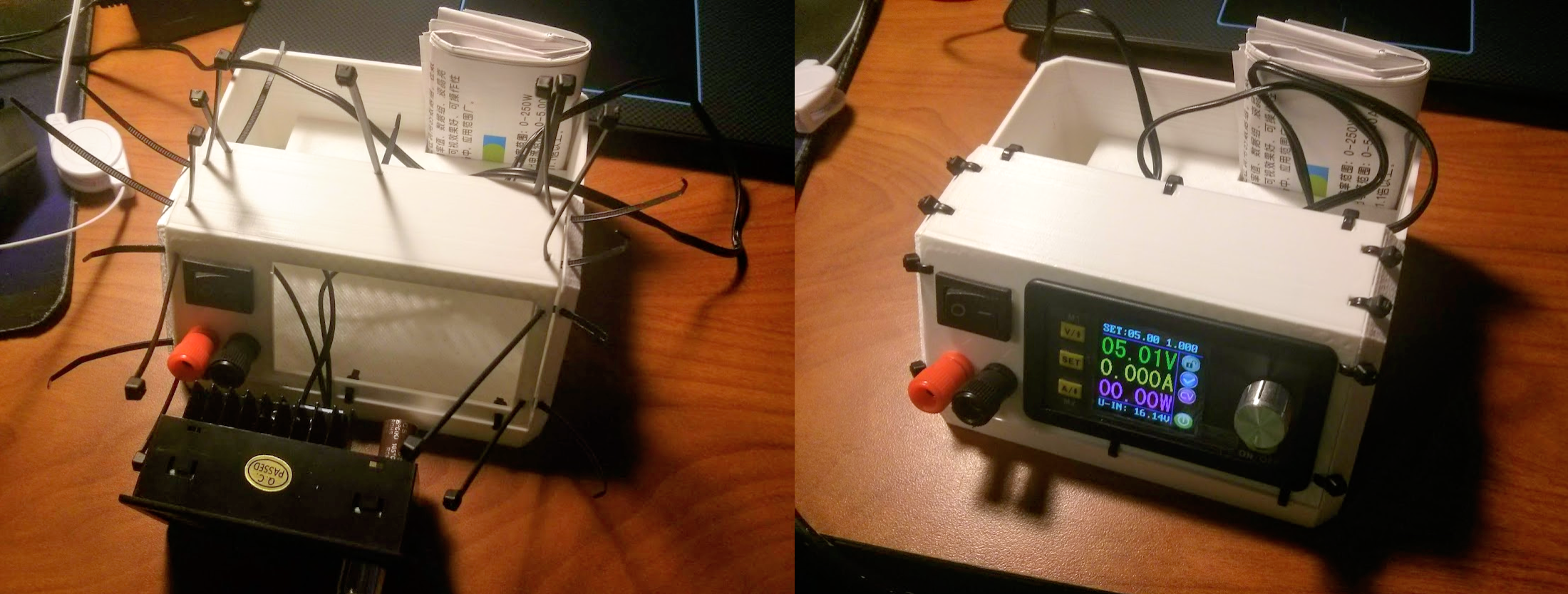
<p>Call me cheap, but I ended up buying a <a href="https://www.aliexpress.com/item/RD-DPS5005-Communication-Function-Constant-Voltage-current-Step-down-Power-Supply-module-buck-Voltage-converter-LCD/1000004290003.html?spm=a2g0s.12269583.0.0.22736152uV6uFs">power supply module</a> from Aliexpress. Could I have gotten a lab bench power supply off of eBay for slightly more? Probably. Would it have been as much fun as getting to design my own enclosure? Definitely not.</p>

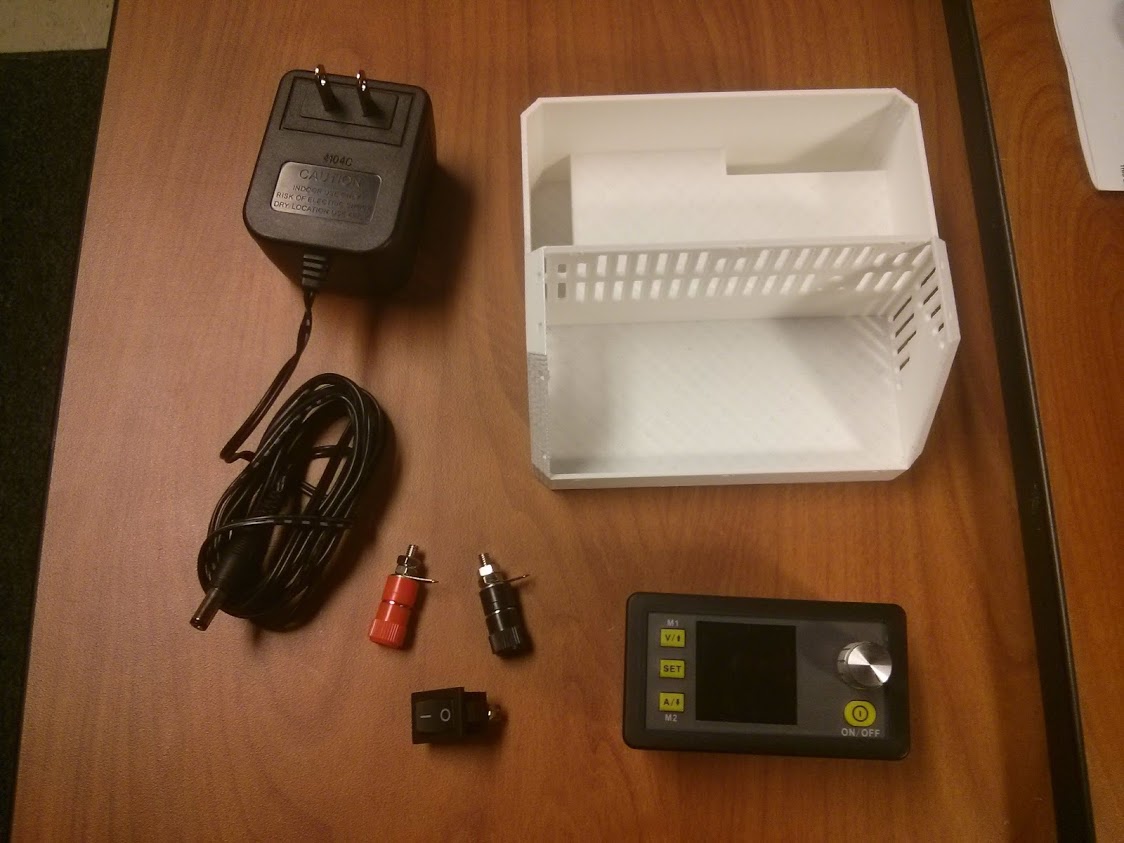
<p>The model I bought was the RD DPS5005. Rated for 50V 5A, it is almost overkill for the type of projects I do, but that’s not a problem. By the time the module arrived, I had already collected all the other parts I would need for the build. The <a href="https://www.aliexpress.com/item/RD-DPS5005-Communication-Function-Constant-Voltage-current-Step-down-Power-Supply-module-buck-Voltage-converter-LCD/1000004290003.html?spm=a2g0s.12269583.0.0.22736152uV6uFs">banana plugs</a> were the only thing I had to buy separately, I had the AC-DC converter and power switch lying around. The AC-DC converter can only output a max of 16V at 500mA but that should be enough for now. If I ever need more power I can buy a better converter.</p>

<p><img src="/BotSpace-blog/images/IMG_20190302_004552.jpg" alt="IMG_20190302_004552.jpg" /></p>

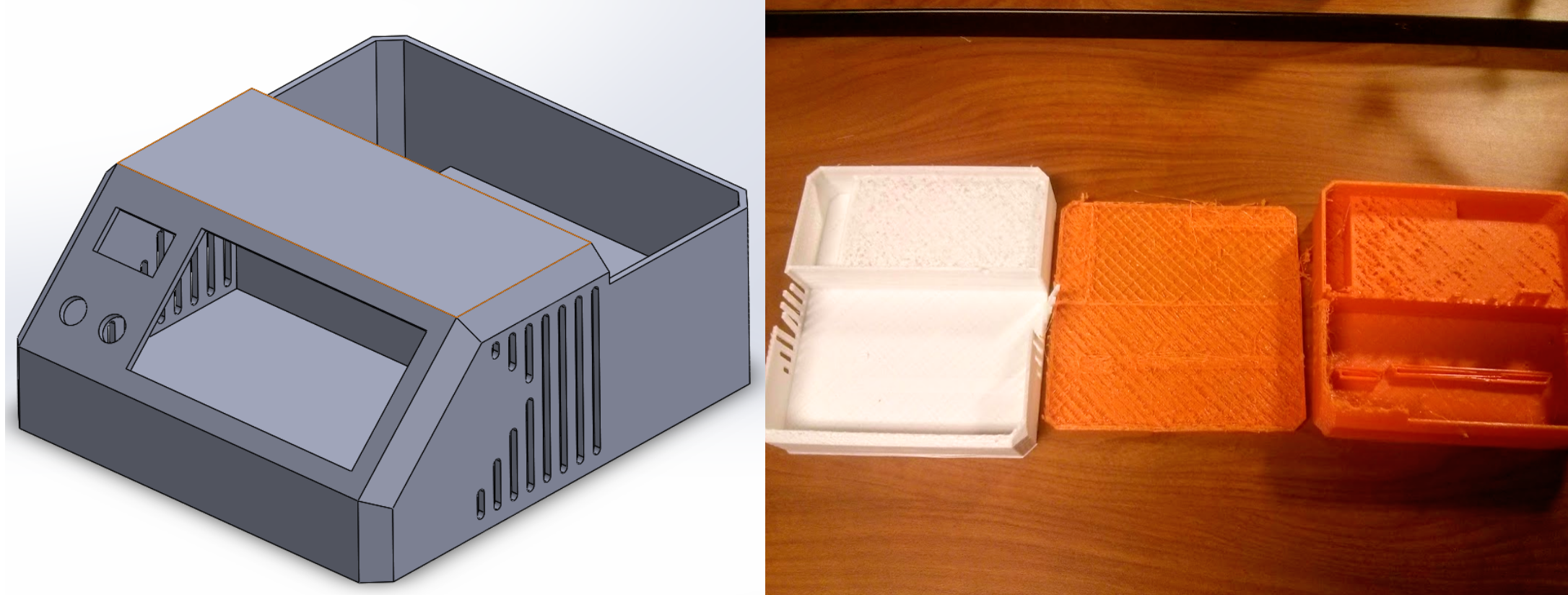
<p>The enclosure is custom designed and 3D printed. It went through a couple of iterations and I am still not quite happy with it, but it gets the job done. I was down to my last roll of PLA and ran out during my first attempt to print the enclosure. After I ordered more PLA, I tried twice to print it with the only other filament I had laying around, some orange PETG, but both prints failed.</p>

<p><img src="/BotSpace-blog/images/PowerSupply7.png" alt="PowerSupply7.png" /></p>

<p>Before my 4th attempt, I changed the model from a single body design to a split chassis and faceplate. I would usually attach these kinds of parts with bolts, but I wanted to test using zip ties.</p>

<p><img src="/BotSpace-blog/images/PowerSupply8.png" alt="" /></p>

<p>The zip ties weren’t too much of a pain but If I make a V2 I will definitely use bolts.</p>]]></content><author><name></name></author><category term="blog" /><summary type="html"><![CDATA[For years I have tested my electronics projects with ‘improvised power supplies’, usually 5V from my laptop USB port, some AA batteries, or a LiPo battery. I have decided I’ve had enough of that.]]></summary></entry><entry><title type="html">IR Distance Sensors</title><link href="https://saintsampo.github.io/BotSpace-blog/IR-Distance-Sensor/" rel="alternate" type="text/html" title="IR Distance Sensors" /><published>2019-02-20T00:00:00+00:00</published><updated>2019-02-20T00:00:00+00:00</updated><id>https://saintsampo.github.io/BotSpace-blog/IR-Distance-Sensor</id><content type="html" xml:base="https://saintsampo.github.io/BotSpace-blog/IR-Distance-Sensor/"><![CDATA[<p>One of the most important things an autonomous robot must be able to do is see and understand its surroundings. There are many ways to accomplish this. If you have a lot of time or money to blow, you could use LIDAR or vision processing but these systems are often unnecessary.</p>

<p><img src="/BotSpace-blog/images/HC-SR04.jpg" alt="" height="120px" width="120px" /></p>

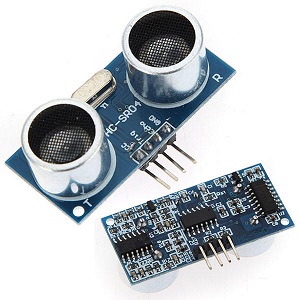
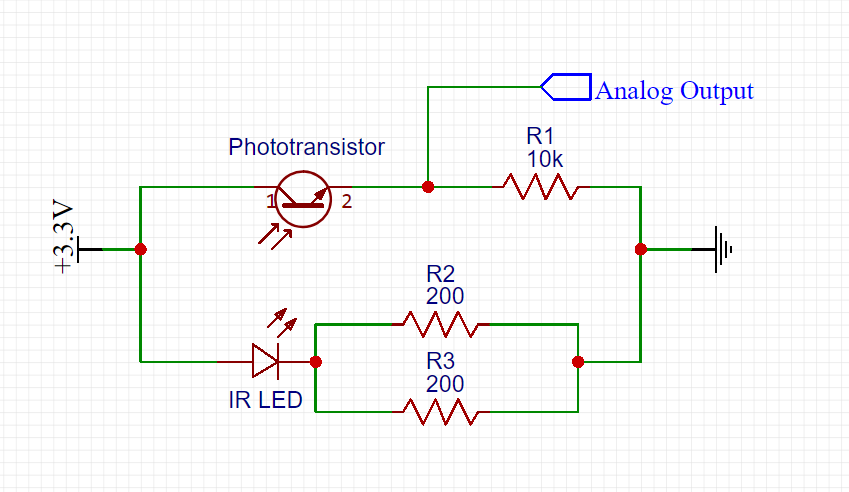
<p>In the past, I have used the ever-popular HC-SR04 ultrasonic distance sensor modules, however for an upcoming project I need something less bulky and more precise. I want to use IR distance sensors. IR distance sensors have two main components, an IR LED and an IR phototransistor. The LED shines on a nearby surface while the phototransistor measures how much of the IR light bounces back. A while back I bought some digital IR distance sensors off <a href="https://www.amazon.com/OSOYOO-Infrared-Obstacle-Avoidance-Arduino/dp/B01I57HIJ0/ref=sr_1_4?ie=UTF8&amp;qid=1550812474&amp;sr=8-4&amp;keywords=ir+distance+sensor">amazon</a> but I needed an analog sensor. I cannibalized an LED and phototransistor from one of the Amazon modules and built a prototype. Here is my schematic:</p>

<p><img src="/BotSpace-blog/images/IRsensorSchematic.png" alt="IRsensorSchematic.png" /></p>

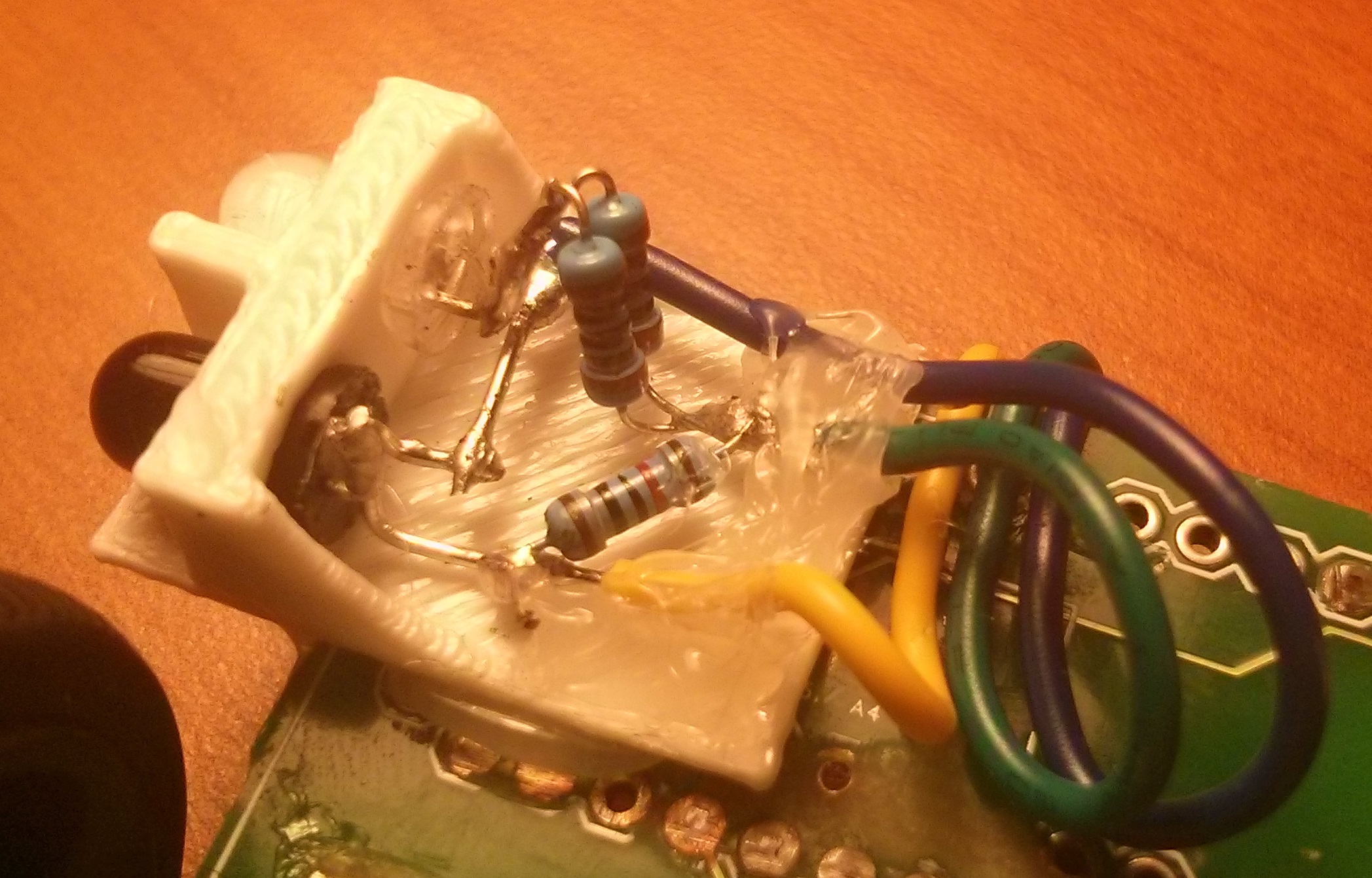
<p>I didn’t have any 100-ohm resistors so I used two 200-ohm resistors in parallel. Here is the sensor:</p>

<p><img src="/BotSpace-blog/images/IMG_20190221_234129.jpg" alt="IMG_20190221_234129.jpg" /></p>

<p>3.3V is blue, GND is green, and analog out is yellow. I know my colors are all wrong, but I was working with what I had.</p>

<p>The output from an IR distance sensor is not useful because the output is inversely proportional to the distance it measures. To get useful output data I roughly followed the steps on <a href="https://home.roboticlab.eu/en/examples/sensor/ir_distance">this</a> webpage. Basically, you can convert the analog data into distance using this equation:</p>

<p>distance = (1 / (a * analogIn + b)) - k</p>

<p>I wasn’t super concerned about precision in this proof of concept so to find a, b, and k, I measured some known distances and recorded the corresponding analog output:</p>

<table>
  <thead>
    <tr>
      <th>Analog value (0-1023)</th>
      <th style="text-align: center">Distance (mm)</th>
    </tr>
  </thead>
  <tbody>
    <tr>
      <td>971</td>
      <td style="text-align: center">20</td>
    </tr>
    <tr>
      <td>810</td>
      <td style="text-align: center">25</td>
    </tr>
    <tr>
      <td>440</td>
      <td style="text-align: center">60</td>
    </tr>
    <tr>
      <td>270</td>
      <td style="text-align: center">120</td>
    </tr>
    <tr>
      <td>210</td>
      <td style="text-align: center">240</td>
    </tr>
    <tr>
      <td>192</td>
      <td style="text-align: center">300</td>
    </tr>
  </tbody>
</table>

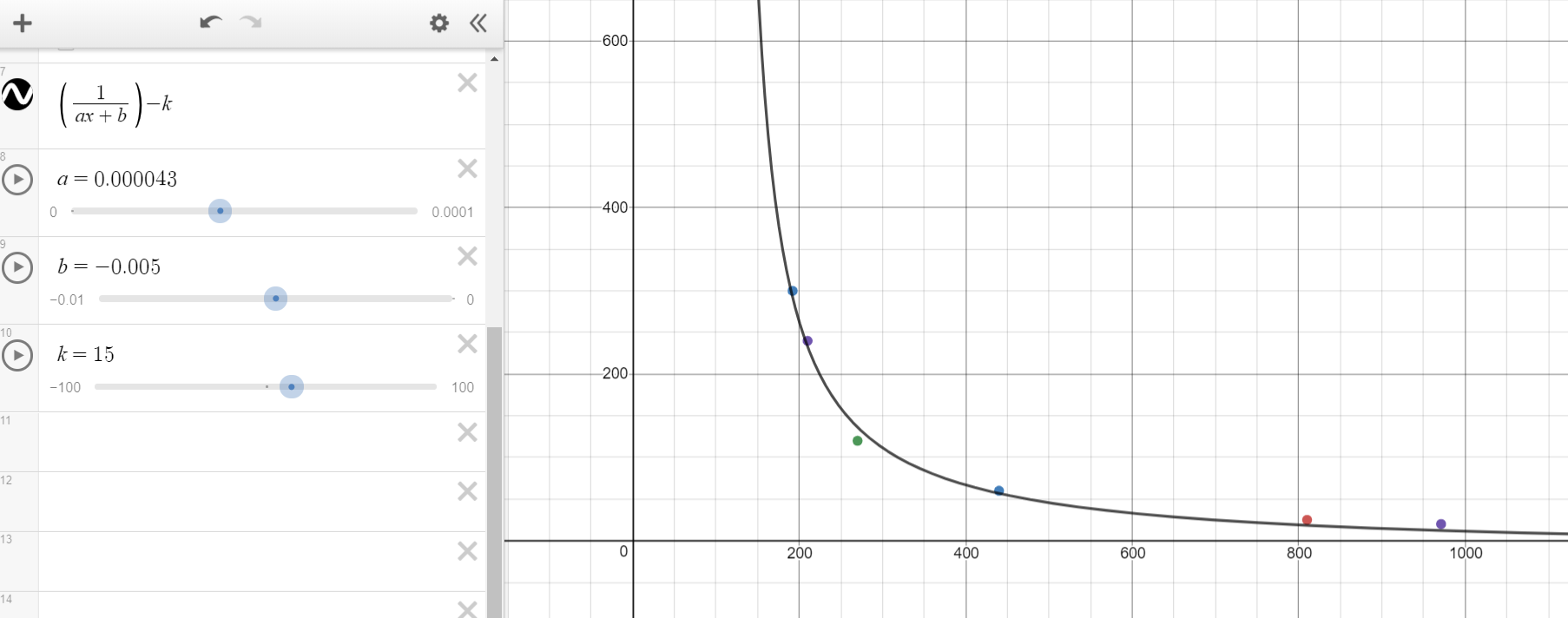
<p>I set up the data, variables, and distance function in a <a href="https://www.desmos.com/calculator/15avgps3ai">desmos</a> plot and adjusted my a, b and k until the plot fit the points:</p>

<p><img src="/BotSpace-blog/images/analogIn vs distance.PNG" alt="analogIn vs distance.PNG" /></p>

<p>I ended up with a = 0.000043, b = -0.005, and k = 15. In order to make the calculation a little easier on your microcontroller the roboticlab page recommened rearanging some of the terms:</p>

<table>
  <tbody>
    <tr>
      <td>distance = (1 / (a * analogIn + b)) - k</td>
    </tr>
    <tr>
      <td>distance = (1 / a) / (analogIn + B / a) - k</td>
    </tr>
    <tr>
      <td>solving for 1/a and B/a, I got this final formula:</td>
    </tr>
    <tr>
      <td>distance = (16667 / (analogIn - 133)) + 15</td>
    </tr>
  </tbody>
</table>

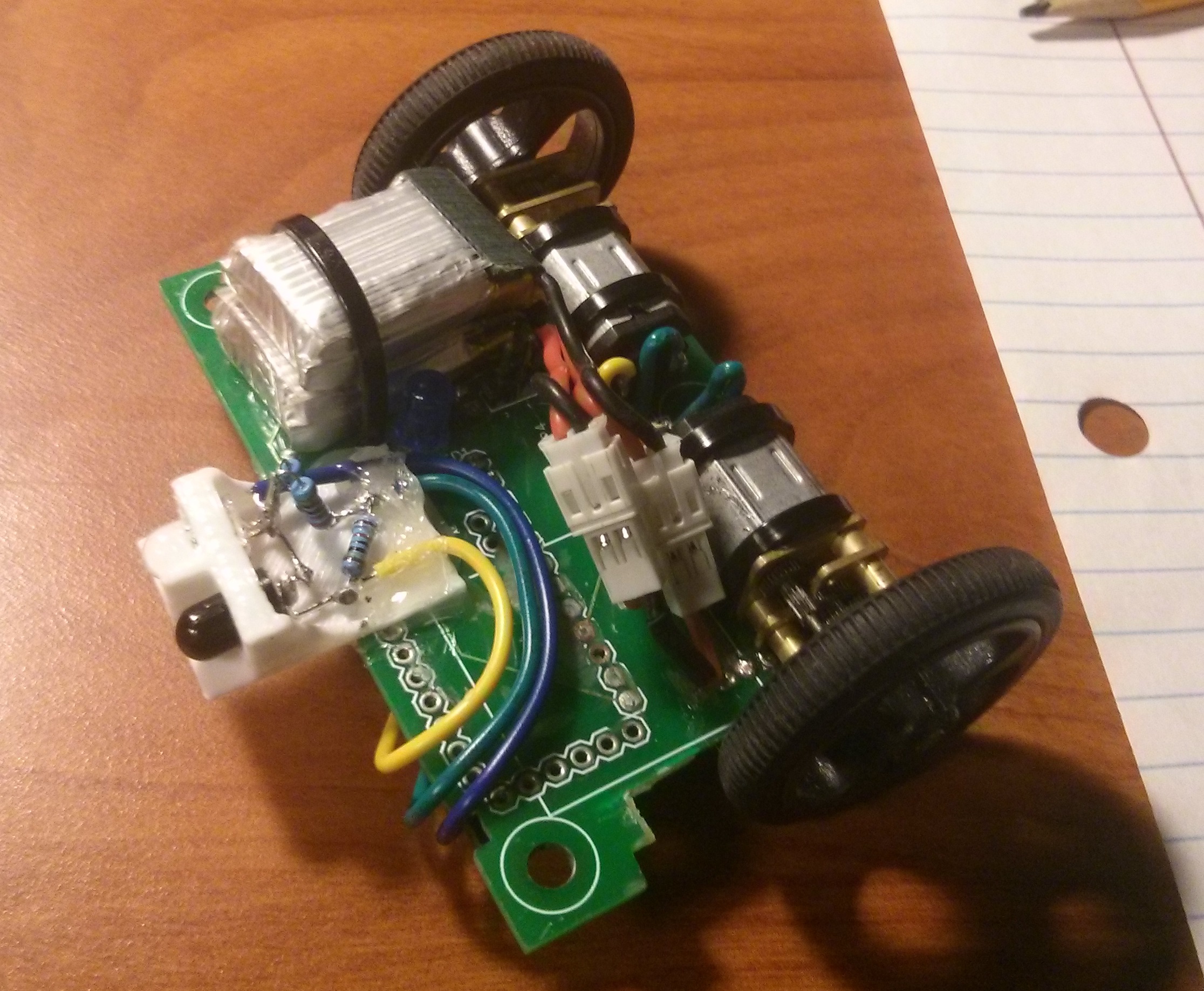
<p>Now that I was reading distance (which was pretty cool by itself) I wanted to implement it on a robot. This chassis is from a previous project, a fairyweight combat robot with a custom controls system. I plan to one day document that project on this blog, but for now just know that it uses an Arduino Pro Mini as the “brain” and an L293D dual H-bridge for driving the motors (these components are underneath the robot).</p>

<p><img src="/BotSpace-blog/images/IMG_20190219_203939.jpg" alt="IMG_20190219_203939.jpg" /></p>

<p>In the first test, I wanted to have the robot maintain a constant distance from whatever was in front of it. It drove forward until it was 20mm from a wall if it became closer than 20mm it would back up. This is called bang-bang control and it was essentially useless as the robot oscillated dramatically. To improve performance I switched it to a PD loop and added a rolling average for the analog inputs. This produced <a href="https://youtu.be/YmUQSCi_pgA">much better results</a>.</p>

<p>There is a lot that can be improved but for now, I am going to call this a success, in my next test I am going to rotate the sensor 90 degrees and see if I can get it to follow a wall while remaining a constant distance from it.</p>]]></content><author><name></name></author><category term="blog" /><summary type="html"><![CDATA[One of the most important things an autonomous robot must be able to do is see and understand its surroundings. There are many ways to accomplish this. If you have a lot of time or money to blow, you could use LIDAR or vision processing but these systems are often unnecessary.]]></summary></entry></feed>